




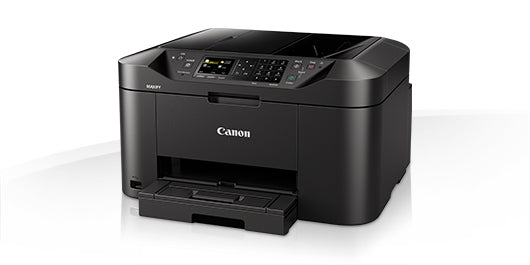

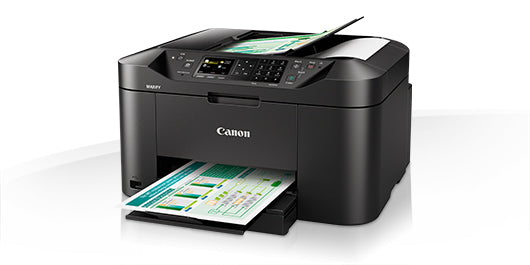


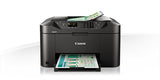
Ask about Canon MAXIFY MB2150 Inkjet A4 600 x 1200 DPI 19 ppm Wi-Fi
Outstanding multifunction colour inkjet printer, scanner, copier and fax, with print and scan support for mobile devices and cloud services, 19 ipm mono print speed and a range of network features. Benefits - Fast printing: 19 ipm mono, 13 ipm colour - Wi-Fi networking for direct printing from mobile devices - Print from and scan to cloud services - 1,200-page mono and 900-page colour ink yields - Stay productive: 250-sheet capacity and 50-sheet ADF High capacity, high quality Versatile printer, scanner, copier and fax designed for home offices that need great mono and colour print quality with a low cost per page. With a large 250-sheet feeder and 50-sheet automatic document feeder, the Canon MAXIFY MB2150 Series produces outstanding prints with vivid colours and crisp text using its marker- and friction-resistant DRHD inks. The Canon MAXIFY MB2150 Series prints A4 at a fast 19 ipm mono and 13 ipm colour, while its first page out time (FPOT) is just 6 seconds. Economical to run From its low energy consumption of just 0.2 kWh (TEC) to the high yield, individually replaceable colour cartridges, economy is a priority. Black cartridges provide an ISO yield of 1,200 pages and colour cartridges 900 pages, letting you work with fewer interruptions. The optional 4-colour multipack offers even more cost-effective printing. Productive and easy to use Double-sided printing and support for a variety of paper sizes and types – from A4 plain paper to labels, envelopes, photo paper and even two-sided ID card copying – makes light work of common office print jobs. Built for productivity, the printer is quick and simple to use: whether printing, copying, scanning or faxing, they’re all within easy each with the Canon MAXIFY MB2150 Series’ 6.2 cm (2.5”) TFT colour screen. Print from smartphones, tablets and the cloud Google Cloud Print, Apple AirPrint (iOS), Mopria and the Canon PRINT app are all supported, as is printing from the cloud and even scanning and saving documents to popular cloud services, including Google Drive, Dropbox, Evernote, OneNote, OneDrive and Concur. Access Point mode means that smart device users can connect to the printer even without a Wi-Fi network. Monitoring and maintenance capabilities IP address filtering provides access rights to only a select number of users, while SMTP support allows secure scan-to-email within an office network. System administrators can quickly and easily configure the printer and restrict certain operations, such as scan-to-USB. Simple network integration System administrators will appreciate the Canon MAXIFY MB2150 Series’ Simple Network Management Protocol (SNMP) compatibility, a device management standard that makes it easy to integrate the printer into existing office networks. SNMP enables a range of maintenance monitoring functions, including ink levels, error status, and page counts.
Caractéristiques
| Duplex printing mode | Auto |
| Print technology | Inkjet |
| Printing | Colour printing |
| Duplex printing | Yes |
| Maximum resolution | 600 x 1200 DPI |
| Print speed (black, normal quality, A4/US Letter) | 19 ppm |
| Print speed (colour, normal quality, A4/US Letter) | 13 ppm |
| Time to first page (black, normal) | 6 s |
| Time to first page (colour, normal) | 7 s |
| Copying | Colour copying |
| Copy speed (black, normal quality, A4) | 18 cpm |
| Copy speed (colour, normal quality, A4) | 10 cpm |
| Maximum number of copies | 99 copies |
| Copier resize | 25 - 400% |
| N-in-1 copy function (N=) | 2, 4 |
| Scanning | Colour scanning |
| Optical scanning resolution | 1200 x 1200 DPI |
| Maximum scan area | 216 x 297 mm |
| Scanner type | Flatbed & ADF scanner |
| Scan technology | CIS |
| Scan to | Cloud, E-mail, HTTP, USB |
| Input colour depth | 48 bit |
| Output colour depth | 24 bit |
| Faxing | Colour faxing |
| Fax resolution (black) | 300 x 300 DPI |
| Fax transmission speed | 3 sec/page |
| Modem speed | 33.6 Kbit/s |
| Fax memory | 250 pages |
| Fax speed dialing (max numbers) | 100 |
| Recommended duty cycle | 200 - 1000 pages per month |
| Maximum duty cycle | 20000 pages per month |
| Number of print cartridges | 4 |
| Printing colours | Black, Cyan, Magenta, Yellow |
| Total number of input trays | 1 |
| Total input capacity | 250 sheets |
| Paper input type | Cassette |
| Auto document feeder (ADF) | Yes |
| Auto document feeder (ADF) input capacity | 50 sheets |
| Maximum ISO A-series paper size | A4 |
| Paper tray media types | Envelopes, Glossy paper, High resolution paper, Matte paper, Plain paper, Semi-glossy paper |
DELIVERY
- Dispatch: Within 24 Hours
- Free shipping across all products on a minimum purchase of $50.
- International delivery time - 7-10 business days
- Cash on delivery might be available
- Easy 30 days returns and exchanges
RETURNS
If you do not like the product you can return it within 15 days - no questions asked. This excludes bodysuits, swimwear and clearance sale items.
We have an easy and hassle free return policy. Please look at our Delivery & Returns section for further information.
- Frequent cleaning with a clean buff cloth without any residue of any cleaning products removes dirt.
- Dusting with a dry cloth can scratch, so lightly spritz your cleaning cloth with water.
- A vacuum cleaner will effectively remove any dust from surfaces and crevices.
- Always use a coaster for drinks, and be mindful of any other potential sources of water damage, such as flower vases.
- Sharp objects can cut right through the surface of the wood, leaving behind unsightly scratches and gouges.
- Do not place hot utensils directly on the table top to avoid damage and discoloration
- Avoid direct sunlight as it will affect your furniture. It can cause
your furniture to lose its shine and luster and begin to fade. - The table is designed to hold food, crockery and utensils, not heavy objects.
- Avoid sitting, standing, or jumping on the dining table or chairs. Also
do not throw heavy objects on the table, as this may damage the
product.